
Yes, AI can build a website in 30 minutes. Here’s what it can’t do.
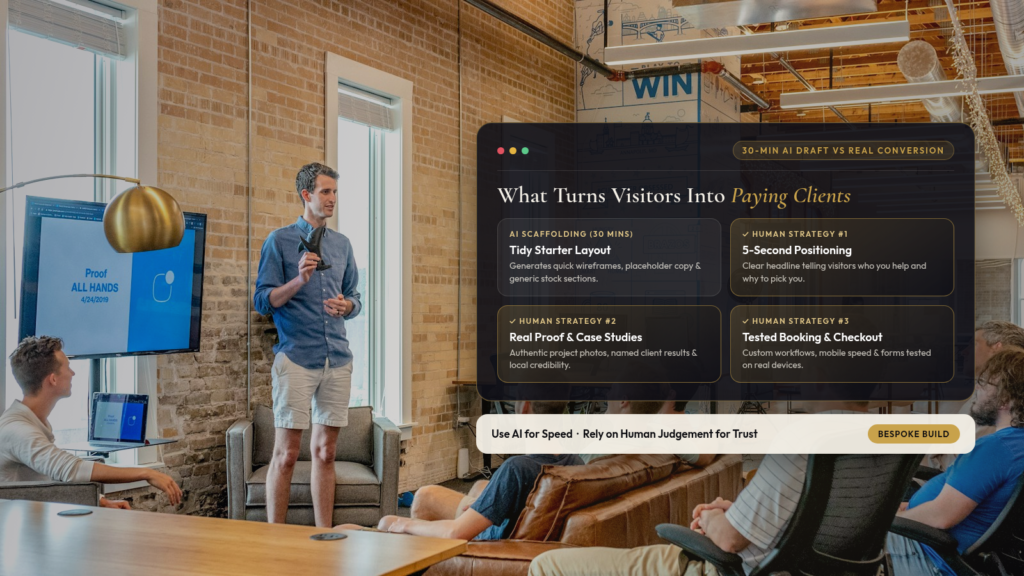
Every week another tool promises to build your business website from a single sentence in half an hour. Here is an honest look at what AI does brilliantly, and the five things it still cannot do for a real business.
AI Tools for Small Business Websites in 2026: What a Birmingham Web Designer Actually Uses

AI tools are everywhere. Every week there’s another platform promising to build your website, create your content or automate your business for you. Working out which AI tools web design actually needs isn’t always obvious. But there’s a big difference between trying an AI tool and actually making it part of the way you work. At Shaan Designs, I’ve been using AI across web design, development, content and digital products for the past year or so. Some tools have genuinely changed the way I work. Others didn’t outlast the free trial. Rather than another list of “the best AI tools in 2026,” this is a look at how I actually use AI in real projects, where it saves time, and where I still think human judgement matters more. Showing Leads Their Website Before They Commit One of the most useful ways I’ve found to use AI has nothing to do with replacing design or development. It’s about making an idea easier for a potential client to understand. A prospective client recently got in touch about a driving school franchise booking platform. Instead of sending over a long written proposal and asking them to imagine what the platform might eventually look like, I used AI to help put together working HTML mockups quickly, so they could see a possible direction, understand how parts of it could behave, and give feedback before either side committed to a full build. That initial concept work eventually developed into a formal engagement with a full project roadmap. For small businesses deciding who to work with, I think this matters more than many of the headline AI features people talk about. Seeing an idea taking shape is far more useful than reading several paragraphs describing what it might become. I use a similar approach on TikTok, creating website concepts and experiments that show potential clients what’s possible before we’ve even had a conversation. AI hasn’t removed the need to understand what a client needs. It’s simply made it much faster to turn that understanding into something they can actually see. Claude and Codex: From an Idea to Working Functionality Claude is one of the tools I use most heavily in development, particularly when I’m working on custom WordPress functionality. Most of the plugin development I do for Shaan Designs now involves Claude somewhere in the workflow, from working through feature logic and edge cases to generating, reviewing and refining the code itself. Before building something, I’ll often use it to work through questions like what should happen when a user takes a particular action, what happens if something fails halfway through, which permissions different users should have, how information should move between the front end and admin area, and what needs testing before a feature is actually finished. I also use Codex alongside it, particularly during build-heavy stretches where the requirements are already clearly defined and there’s a larger amount of development work to get through. Which tool I reach for depends on the problem, but neither replaces the process itself: build, test, find problems, fix them, test again. AI can produce a large amount of code very quickly. Whether that code is reliable enough for a real business to depend on still comes down to testing, judgement, and taking responsibility for what eventually goes live. ChatGPT: Direction Before Generation Away from development, ChatGPT is usually where I work out direction before I start generating anything. For web design, I use it alongside Relume to work through page structure and content direction before moving into the visual design stage. ChatGPT helps me think through what a page actually needs to communicate, which sections matter, and what journey someone should follow through the site. Relume then turns that thinking into an initial sitemap or wireframe I can pull into Figma and refine properly. I use the same approach for animation, video and social content. Tools that charge credits per generation punish trial and error, so I’ll usually work out the script, pacing or purpose of a piece first, then generate once I have a clearer idea of what I’m actually trying to produce. For me, that’s one of the most practical uses of AI: not always creating the finished thing, but cutting down the wasted work it takes to get there. Higgsfield and Google Flow: Creating Video Without a Production Crew Video has traditionally been one of the more expensive types of content for a small business to produce properly. You need cameras, lighting, locations, editing, and often actors or presenters. I use both Higgsfield and Google Flow depending on what I’m trying to produce. Sometimes the priority is strong camera control, other times I need several shots to feel like one continuous sequence rather than a set of disconnected AI clips. That makes both tools useful for website content, promotional concepts and social media, where a full production shoot wouldn’t make financial sense. The technology itself is moving quickly. Video, voice, lip-syncing and audio generation are increasingly overlapping, so the process isn’t as separated as it was even a couple of years ago. But the same rule applies regardless of which model produced it: if the finished video looks poor, feels generic or doesn’t communicate anything useful, the fact that AI made it isn’t particularly interesting. The output still has to serve a purpose. ElevenLabs: Giving Content a Voice Voice generation is another area where AI has removed a real production barrier. A small business no longer necessarily needs a recording studio, a microphone setup and hours of editing every time it wants professional narration. I use ElevenLabs for things like website videos, product walkthroughs, social content and tutorials. For a business without an internal marketing team or a regular voice-over budget, that opens up content that would previously have been too expensive or time-consuming to produce. But realistic narration doesn’t automatically make good content. The script still has to be worth listening to. Why AI Tools Web Design Still Needs the Traditional Toolkit Despite